SORTING ALGORITHMS (nLogn)
Merge Sort (mid)
https://www.geeksforgeeks.org/merge-sort/
Find mid point, merge sort left half, merge sort right half, merge the two sorted halves
- Divide and Conquer algorithm
- O(nLogn) - time complexity for all three cases (worst, average, best)
- Stable, but not in place - O(n) space complexity
Usage:
a) Sorting linked lists
b) Inversion Count Problem in a nearly sorted array ( i < j, but A[i] > A[j] )
c) Used in External Sorting (data too big to fit into memory, resides in slower external memory (hard disk))
def merge_sort(arr):

    # arrays of length 1 will be returned as is
    if len(arr) > 1:

        # find mid point, sort each half
        mid = len(arr) // 2
        left =  merge_sort(arr[ :mid ])           # sort the first half
        right = merge_sort(arr[ mid: ])           # sort the first half

        # copy data from temp arrays 'left' and 'right'
        i, j, k = 0, 0, 0
        while i < len(left) and j < len(right):
            if left[i] < right[j]:
                arr[k] = left[i]
                i += 1
            else:
                arr[k] = right[j]
                j += 1
            k += 1

        # check if anything is left
        while i < len(left):
            arr[k] = left[i]
            i += 1
            k += 1

        while j < len(right):
            arr[k] = right[j]
            j += 1
            k += 1

    return arr
# test sorting f(x)
a, b, c, d = [8, 7, 4, 2, 1, 25, 29, 38, 45, 5, 101, 97, 73, 74, 72, 55], [8, 7, 4, 2, 1], [8, 7, 2, 11], [8, 7]
for myarr in [a, b, c, d]:
    print(myarr, end=' ')
    print('=> ', merge_sort(myarr))
[8, 7, 4, 2, 1, 25, 29, 38, 45, 5, 101, 97, 73, 74, 72, 55] =>  [1, 2, 4, 5, 7, 8, 25, 29, 38, 45, 55, 72, 73, 74, 97, 101]
[8, 7, 4, 2, 1] =>  [1, 2, 4, 7, 8]
[8, 7, 2, 11] =>  [2, 7, 8, 11]
[8, 7] =>  [7, 8]
Quick Sort (pivot)
https://www.geeksforgeeks.org/quick-sort/
Picks pivot element (first, last, random, median) and partition array: put all smaller elements before pivot, greater elements after pivot (linear time), and the pivot in between
- Divide and Conquer algorithm
- O(nLogn) - time complexity for average and best cases, O(n^2) worst case
- O(log(n)) extra space, but qualifies as in-place (no extra space)
- Not stable, but can be made stable
Usage:
Although the worst case time complexity is more than many other sorting algorithms, QuickSort is faster in practice because its inner loop can be efficiently implemented.
Quick sort is preferred over merge sort for sorting arrays (because in-place sort while merge sort = O(N) space (N = array size) - memory allocation increases run time
Merge sort is preferred over quick sort for linked lists (different memory alloc.: unlike arrays, a) linked list nodes may not be adjacent in memory, and b) insert is O(1) extra space and O(1) time in linked lists => merge operation - without extra space)
3 Way QuickSort, an array arr[l..r] is divided in 3 parts:
a) arr[l..i] elements less than pivot
b) arr[i+1..j-1] elements equal to pivot
c) arr[j..r] elements greater than pivot
# Take last element as pivot, place it in its correct position:
#  elements smaller than pivot - to the left
# elements greater than pivot - to the right
def quick_sort(arr, low, high):
    '''
        low   -> Starting index,
        high  -> Ending index
    '''
    if low < high:

        pi = partition(arr, low, high)                        # pi = partitioning index, arr[pi] at right place
        quick_sort(arr, low, pi-1)                            # sort elements before and after partition
        quick_sort(arr, pi+1, high)


def partition(arr, low, high):

    pivot = arr[high]                                          # pivot
    i = low - 1                                                # index of smaller element

    for j in range(low , high):

        if  arr[j] < pivot:                                    # current element smaller than pivot
            i += 1                                             # increment index of smaller element
            arr[i], arr[j] = arr[j], arr[i]

    arr[i+1], arr[high] = arr[high], arr[i+1]                  # all elems < pivot are not in arr[low:i], this line
                                                               # places pivot in the middle (it was arr[high] before)

    return i+1
Heap Sort
- O(nLogn) - time complexity; rearrange heap for the next largest (or smallest) element OR heapify() = O(Logn), repeating this over n elements OR createAndBuildHeap() = O(n)
- in-place
- not stable, but can be made stable
Usage:
1. Sort a nearly sorted (or K sorted) array
2. k largest (or smallest) elements in an array
Limited usage because Quicksort and Mergesort are better in practice, but the Heap data structure is widely used
Complete binary tree = binary tree in which every level is completely filled, except possibly the last, and all nodes are as far left as possible.
Binary Heap = Complete Binary Tree where items are in a special order: value in parent node is greater (or smaller) than values in its two children nodes OR max heap (min heap); can be represented as binary tree or array. Array - space efficient. If node's index = i, node's parent = (i-1)/2, left child = 2 * i + 1, right child = 2 * i + 2, (if 0-based indexing).
Heap Sort for sorting in increasing order (comparison based): 1. Build max heap from input => max item at the root of heap; 2. Replace max with last item of heap and reduce heap size by 1; heapify root; 3. Repeat above while size of heap > 1.
heapify(node) possible only if node's children nodes are heapified - heapify() is done bottom up
Array Representation
* root = arr[0];
* for any i-th node arr[i]:
a) arr[(i-1)/2] = parent node
b) arr[(2i)+1] = left child
c) arr[(2i)+2] = right child
Traversal method to achieve array representation - Level Order
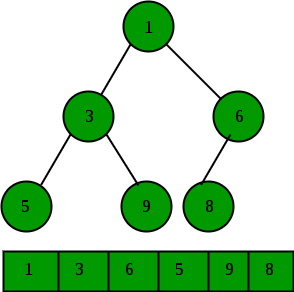
8, 7, 4, 2, 1
def heap_sort(arr):

    n = len(arr)

    for i in range(n, -1, -1):                        # build max heap
        heapify(arr, n, i)

    for i in range(n-1, 0, -1):                       # One by one extract elements
        arr[i], arr[0] = arr[0], arr[i]               # swap
        heapify(arr, i, 0)                            # heapify root


def heapify(arr, n, i):

    largest = i                                       # find largest among root and children
    l = 2 * i + 1
    r = 2 * i + 2

    if (l < n and arr[i] < arr[l]):
        largest = l

    if (r < n and arr[largest] < arr[r]):
        largest = r

    if (largest != i):                                # If root is not largest, swap with largest and continue heapifying
        arr[i],arr[largest] = arr[largest],arr[i]
        heapify(arr, n, largest)
# test sorting f(x)
a, b, c, d = [8, 7, 4, 2, 1, 25, 29, 38, 45, 5, 101, 97, 73, 74, 72, 55], [8, 7, 4, 2, 1], [8, 7, 2, 11], [8, 7]
for arr in [a, b, c, d]:
    print(arr, end=' ')
    heap_sort(arr)                         # in-place sorting
    print('=> ', arr)
[8, 7, 4, 2, 1, 25, 29, 38, 45, 5, 101, 97, 73, 74, 72, 55] =>  [1, 2, 4, 5, 7, 8, 25, 29, 38, 45, 55, 72, 73, 74, 97, 101]
[8, 7, 4, 2, 1] =>  [1, 2, 4, 7, 8]
[8, 7, 2, 11] =>  [2, 7, 8, 11]
[8, 7] =>  [7, 8]
SEARCH ALGORITHMS
Linear / Sequential Search
Worst-case performance O(n) Best-case performance O(1) Average performance O(n) Worst-case space complexity O(1) iterative
Linear search is rarely used practically because other search algorithms such as the binary search algorithm and hash tables have a significantly performance
def linear_search(arr, x):

    for i in range (0, len(arr)):
        if (arr[i] == x):
            return i
    return -1
# If we know the list is ordered than, we only have to check until we have found the element or an element greater than it
def ordered_seq_search(arr,ele):
    """
    Sequential search for an Ordered list
    """
    # Start at position 0
    pos = 0

    # Target becomes true if ele is in the list
    found = False

    # Stop marker
    stopped = False

    # go until end of list
    while pos < len(arr) and not found and not stopped:

        # If match
        if arr[pos] == ele:
            found = True

        else:

            # Check if element is greater
            if arr[pos] > ele:
                stopped = True

            # Otherwise move on
            else:
                pos  = pos+1

    return found
arr = [ 2, 3, 4, 10, 40 ]
x = 10
result = linear_search(arr, x)
if(result == -1):
    print("Element is not present in array")
else:
    print("Element is present at index", result)
Element is present at index 3
Binary Search
Sorted list => reduces time complexity to O(Log n)
Auxiliary Space: O(1) iterative implementation, O(Logn) recursion
# iterative
def binary_search(arr, value):

    if len(arr) == 0: return None

    min_idx, max_idx= 0, len(arr)

    while min_idx < max_idx:
        mid = (min_idx + max_idx) // 2

        if arr[mid] == value:
            return mid
        elif arr[mid] < value:
            min_idx = mid + 1
        else: max_idx = mid

    return None
# recursive
# have to keep arr intact and pass array bounds to recursion to get the correct mid point index
# if array bounds are not passed, only the boolean version works (found / not found)
def binary_search_rec(arr, value, start=None, end=None):

    length = len(arr)

    if start is None:
        start = 0
    if end is None:
        end = len(arr) - 1

    if not length or start >= end:
        return None

    mid = (start + end) // 2
    if arr[mid] == value:
        return mid

    elif arr[mid] > value:
        return binary_search_rec(arr, value, start = start, end = mid)

    else:
        return binary_search_rec(arr, value, start = mid + 1, end = length)

    return None
array = [1,2,3,4,5,6,7,8,9]
num = 8
print(binary_search(array, num))
print(binary_search_rec(array, num))
7
7
Hash Table
Hash Table with Hash Functions (mapping). Python's dictionary => Hash Table
Methods:
- HashTable() returns an empty map collection.
- put(key,val) add a new key-value pair, if key in the map - replace with the new value.
- get(key) return the value for a given key or None otherwise.
- del delete key-value pair: del map[key].
- len() number of key-value pairs
- key in map: True if key in map, False otherwise
Hash function
Two heuristic methods:
Hashing by division (mod method):
Map a key into one of the slots of table by taking the remainder of key divided by table_size:
h(key) = key % table_size
Fast - single division.
Avoid certain values of table_size: if table_size = r^p, then h(key) is just the p lowest-order bits of key - better off designing the hash function to depend on all the bits of the key unless we know that all low-order p-bit patterns are equally likely.
Best results when table size = prime with additional restriction - if r = number of possible character codes on a computer, and if table_size = prime such that r % table_size = 1, then h(key) = key % table_size is sum of the binary representation of the characters in key % table_size.
Example:
Suppose r = 256 and table_size = 17, in which r % table_size i.e. 256 % 17 = 1.
Key = 37596, its hash is 37596 % 17 = 12
But for key = 573, its hash function is also 573 % 12 = 12 - collision
A prime not too close to an exact power of 2 is often good choice for table_size.
Hashing by multiplication:
Multiply key k by constant real number c, 0 < c < 1, => extract fractional part => multiply this by table_size m and take floor:
h(k) = floor (m * frac (k * c))
or
h(k) = floor (m * (k * c mod 1))
floor(x) from math.h yields integer part of real number x, and frac(x) yields fractional part (frac(x) = x – floor(x))
Value of m is not critical, typically choose a power of 2 (m = 2p for some integer p)
Example:
Suppose k = 123456, p = 14,
m = 2^14 = 16384, and w = 32.
Adapting Knuth’s suggestion, c to be fraction of the form s / 2^32.
Then key * s = 327706022297664 = (76300 * 2^32) + 17612864,
So r1 = 76300 and r0 = 176122864.
The 14 most significant bits of r0 yield the value h(key) = 67.
class HashTable:

    def __init__(self, size):

        # Set up size and keys and values
        self.size = size
        self.keys = [None] * self.size
        self.values = [None] * self.size

    def put(self, key, value):

        #Note, we'll only use integer keys for ease of use with the Hash Function
        # Get the hash value
        hashvalue = self.hashfunction(key, len(self.keys))

        # If key is empty
        if self.keys[hashvalue] == None:
            self.keys[hashvalue] = key
            self.values[hashvalue] = value

        else:

            # If key exists, replace with new value
            if self.keys[hashvalue] == key:
                self.values[hashvalue] = value

            # If hashvalue has a different key
            else:

                nextkey = self.rehash(hashvalue, len(self.keys))

                # Get to next key
                while self.keys[nextkey] != None and self.keys[nextkey] != key:
                    nextkey = self.rehash(nextkey, len(self.keys))

                # Set new key, if NONE
                if self.keys[nextkey] == None:
                    self.keys[nextkey]=key
                    self.values[nextkey]=value

                # Otherwise replace old value
                else:
                    self.values[nextkey] = value

    def hashfunction(self, key, size):

        # Remainder Method
        return key%size

    def rehash(self, oldhash, size):

        # For finding next possible keys
        return (oldhash+1)%size


    def get(self, key):

        # Get value by key
        # Set up variables for search
        startkey = self.hashfunction(key, len(self.keys))
        value = None
        found = False
        stop = False
        position = startkey

        # Until we discern that its not empty or found (and haven't stopped yet)
        while self.keys[position] != None and not found and not stop:

            if self.keys[position] == key:
                found = True
                value = self.values[position]

            else:
                position=self.rehash(position, len(self.keys))

                if position == startkey:
                    stop = True

        return value

    # Special Methods for use with Python list indexing
    # https://stackoverflow.com/questions/43627405/understanding-getitem-method
    def __getitem__(self, key):
        return self.get(key)

    def __setitem__(self, key, value):
        self.put(key, value)
h = HashTable(5)

# Put our first key in
h[0] = 'one'
h[2] = 'two'
h[3] = 'three'
print(h[0])
one
h[1] = 'new_one'
h[1]
'new_one'
print(h[4])
None
'two' in h
True
Edit Levenshtein Distance
https://stackoverflow.com/questions/2460177/edit-distance-in-python https://en.wikibooks.org/wiki/Algorithm_Implementation/Strings/Levenshtein_distance#Python
def levenshtein(s1, s2):

    if len(s1) > len(s2):
        s1, s2 = s2, s1

    distances = range(len(s1) + 1)
    for idx2, char2 in enumerate(s2):

        distances_ = [ idx2+1 ]
        for idx1, char1 in enumerate(s1):
            if char1 == char2:
                distances_.append( distances[ idx1] )
            else:
                distances_.append( 1 + min(( distances[idx1], distances[idx1+1], distances_[-1])) )
        distances = distances_

    return distances[-1]
levenshtein2('aborigenous', 'sc')
11
Iterators
Iterators in Python Iterators are everywhere in Python. They are elegantly implemented within for loops, comprehensions, generators etc. but are hidden in plain sight.
Iterator in Python is simply an object that can be iterated upon. An object which will return data, one element at a time.
Technically speaking, a Python iterator object must implement two special methods, __iter__() and __next__(), collectively called the iterator protocol.
An object is called iterable if we can get an iterator from it. Most built-in containers in Python like: list, tuple, string etc. are iterables.
The iter() function (which in turn calls the __iter__() method) returns an iterator from them
Iterating Through an Iterator
We use the next() function to manually iterate through all the items of an iterator. When we reach the end and there is no more data to be returned, it will raise the StopIteration Exception. Following is an example
my_list = [4, 7, 0, 3]
my_iter = iter(my_list)                                                             # get an iterator using iter()

# iterate
print(next(my_iter))
print(next(my_iter))

print(my_iter.__next__())                                                           # next(obj) is same as obj.__next__()
print(my_iter.__next__())

next(my_iter)                                                                       # This will raise error, no items left
4
7
0
3
---------------------------------------------------------------------------
StopIteration                             Traceback (most recent call last)
<ipython-input-13-a6eddb463d41> in <module>
      9 print(my_iter.__next__())
     10
---> 11 next(my_iter)                                                                       # This will raise error, no items left

StopIteration:
Building Custom Iterators Building an iterator from scratch is easy in Python. We just have to implement the iter() and the next() methods.
The iter() method returns the iterator object itself. If required, some initialization can be performed.
The next() method must return the next item in the sequence. On reaching the end, and in subsequent calls, it must raise StopIteration.
Here, we show an example that will give us the next power of 2 in each iteration. Power exponent starts from zero up to a user set number.
class PowTwo:
    """Class to implement an iterator
    of powers of two"""

    def __init__(self, max=0):
        self.max = max

    def __iter__(self):
        self.n = 0
        return self

    def __next__(self):
        if self.n <= self.max:
            result = 2 ** self.n
            self.n += 1
            return result
        else:
            raise StopIteration


# create an object
numbers = PowTwo(3)

# create an iterable from the object
i = iter(numbers)

# Using next to get to the next iterator element
print(next(i))
print(next(i))
print(next(i))
print(next(i))
print(next(i))
1
2
4
8
---------------------------------------------------------------------------
StopIteration                             Traceback (most recent call last)
<ipython-input-14-e79078ee3bcd> in <module>
     30 print(next(i))
     31 print(next(i))
---> 32 print(next(i))

<ipython-input-14-e79078ee3bcd> in __next__(self)
     16             return result
     17         else:
---> 18             raise StopIteration
     19
     20

StopIteration:
Infinite iterators It is not necessary that the item in an iterator object has to be exhausted. There can be infinite iterators (which never ends). We must be careful when handling such iterators.
Here is a simple example to demonstrate infinite iterators.
The built-in function iter() function can be called with two arguments where the first argument must be a callable object (function) and second is the sentinel. The iterator calls this function until the returned value is equal to the sentinel.
print(int())
inf = iter(int,1)
print(next(inf))
print(next(inf))
0
0
0
class InfIter:
    """Infinite iterator to return all
        odd numbers"""

    def __iter__(self):
        self.num = 1
        return self

    def __next__(self):
        num = self.num
        self.num += 2
        return num


a = iter(InfIter())
for i in range(5):
    print(next(a))
1
3
5
7
9
Be careful to include a terminating condition, when iterating over these types of infinite iterators.
The advantage of using iterators is that they save resources. Like shown above, we could get all the odd numbers without storing the entire number system in memory. We can have infinite items (theoretically) in finite memory.
There's an easier way to create iterators in Python. To learn more visit: Python generators using yield
Generators
Python generators are a simple way of creating iterators. All the work we mentioned above are automatically handled by generators in Python.
Simply speaking, a generator is a function that returns an iterator object which we can iterate over (one value at a time)
It is fairly simple to create a generator in Python. It is as easy as defining a normal function, but with a yield statement instead of a return statement.
If a function contains at least one yield statement (it may contain other yield or return statements), it becomes a generator function. Both yield and return will return some value from a function.
The difference is that while a return statement terminates a function entirely, yield statement pauses the function saving all its states and later continues from there on successive calls
Differences between Generator function and Normal function Here is how a generator function differs from a normal function.
Generator function contains one or more yield statements. When called, it returns an object (iterator) but does not start execution immediately. Methods like iter() and next() are implemented automatically. So we can iterate through the items using next(). Once the function yields, the function is paused and the control is transferred to the caller. Local variables and their states are remembered between successive calls. Finally, when the function terminates, StopIteration is raised automatically on further calls.
Memory Efficiency: A normal function to return a sequence will create the entire sequence in memory before returning the result. This is an overkill, if the number of items in the sequence is very large.
Generator implementation of such sequences is memory friendly and is preferred since it only produces one item at a time
Generators can be implemented in a clear and concise way as compared to their iterator class counterpart. Following is an example to implement a sequence of power of 2 using an iterator class
def PowTwoGen(max=0):
    n = 0
    while n < max:
        yield 2 ** n
        n += 1

y = PowTwoGen(3)
for i in range(5):
    print(next(y))
1
2
4
---------------------------------------------------------------------------
StopIteration                             Traceback (most recent call last)
<ipython-input-25-12431e026824> in <module>
      7 y = PowTwoGen(3)
      8 for i in range(5):
----> 9     print(next(y))

StopIteration:
Generators are excellent mediums to represent an infinite stream of data which is not stored in memeory
# do not run :)
def all_even():
    n = 0
    while True:
        yield n
        n += 2
Multiple generators can be used to pipeline a series of operations. E.g. sum of squares of numbers in the first 10 Fibonacci series. Result: efficient, easy to read, a lot cooler!
def fibonacci_numbers(nums):
    x, y = 0, 1
    for _ in range(nums):
        x, y = y, x+y
        yield x

def square(nums):
    for num in nums:
        yield num**2

print(sum(square(fibonacci_numbers(10))))
4895