01Stacks Overview
Source notebook: Stacks Overview.ipynb
Stacks Overview
Please see the lecture video for the full Overview on Stacks!
A stack is an ordered collection of items where the addition of new items and the removal of existing items always takes place at the same end. This end is commonly referred to as the “top.” The end opposite the top is known as the “base.”
The base of the stack is significant since items stored in the stack that are closer to the base represent those that have been in the stack the longest. The most recently added item is the one that is in position to be removed first.
This ordering principle is sometimes called LIFO, last-in first-out. It provides an ordering based on length of time in the collection. Newer items are near the top, while older items are near the base.
For example, consider the figure below:
from IPython.display import Image
url ='https://upload.wikimedia.org/wikipedia/commons/b/b4/Lifo_stack.png'

Image(url)
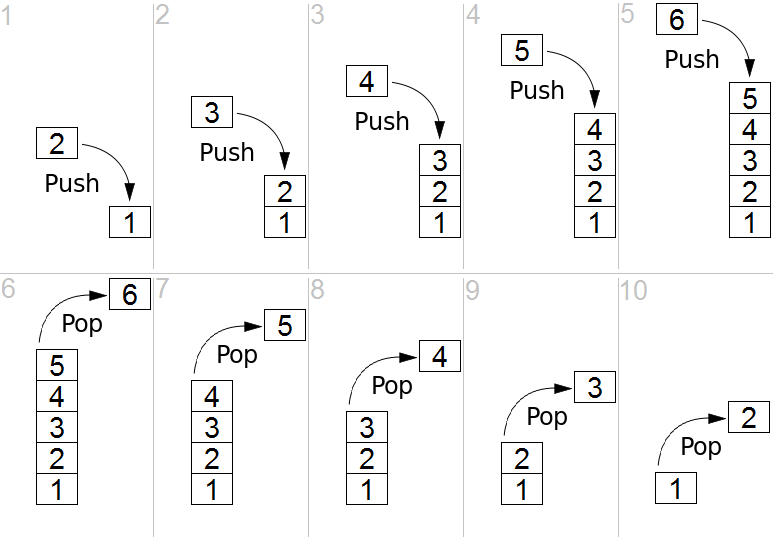
Note how the first items "pushed" to the stack begin at the base, and as items are "popped" out. Stacks are fundamentally important, as they can be used to reverse the order of items. The order of insertion is the reverse of the order of removal.
Considering this reversal property, you can perhaps think of examples of stacks that occur as you use your computer. For example, every web browser has a Back button. As you navigate from web page to web page, those pages are placed on a stack (actually it is the URLs that are going on the stack). The current page that you are viewing is on the top and the first page you looked at is at the base. If you click on the Back button, you begin to move in reverse order through the pages.
In the next lecture we will implement our own Stack class!
Extra Resources:
02Implementation of Stack
Source notebook: Implementation of Stack.ipynb
Implementation of Stack
Stack Attributes and Methods
Before we implement our own Stack class, let's review the properties and methods of a Stack.
The stack abstract data type is defined by the following structure and operations. A stack is structured, as described above, as an ordered collection of items where items are added to and removed from the end called the “top.” Stacks are ordered LIFO. The stack operations are given below.
- Stack() creates a new stack that is empty. It needs no parameters and returns an empty stack.
- push(item) adds a new item to the top of the stack. It needs the item and returns nothing.
- pop() removes the top item from the stack. It needs no parameters and returns the item. The stack is modified.
- peek() returns the top item from the stack but does not remove it. It needs no parameters. The stack is not modified.
- isEmpty() tests to see whether the stack is empty. It needs no parameters and returns a boolean value.
- size() returns the number of items on the stack. It needs no parameters and returns an integer.
Stack Implementation
class Stack:


    def __init__(self):
        self.items = []

    def isEmpty(self):
        return self.items == []

    def push(self, item):
        self.items.append(item)

    def pop(self):
        return self.items.pop()

    def peek(self):
        return self.items[len(self.items)-1]

    def size(self):
        return len(self.items)
Let's try it out!
s = Stack()
print s.isEmpty()
True
s.push(1)
s.push('two')
s.peek()
'two'
s.push(True)
s.size()
3
s.isEmpty()
False
s.pop()
True
s.pop()
two
s.size()
1
s.pop()
1
s.isEmpty()
True
Good Job!
03Queues Overview
Source notebook: Queues Overview.ipynb
Queues Overview
In this lecture we will get an overview of what a Queue is, in the next lecture we will implement our own Queue class.
A queue is an ordered collection of items where the addition of new items happens at one end, called the “rear,” and the removal of existing items occurs at the other end, commonly called the “front.” As an element enters the queue it starts at the rear and makes its way toward the front, waiting until that time when it is the next element to be removed.
The most recently added item in the queue must wait at the end of the collection. The item that has been in the collection the longest is at the front. This ordering principle is sometimes called FIFO, first-in first-out. It is also known as “first-come first-served.”
The simplest example of a queue is the typical line that we all participate in from time to time. We wait in a line for a movie, we wait in the check-out line at a grocery store, and we wait in the cafeteria line. The first person in that line is also the first person to get serviced/helped.
Let's see a diagram which shows this and compares it to the Stack Data Structure:
from IPython.display import Image
url = 'https://netmatze.files.wordpress.com/2014/08/queue.png'
Image(url)
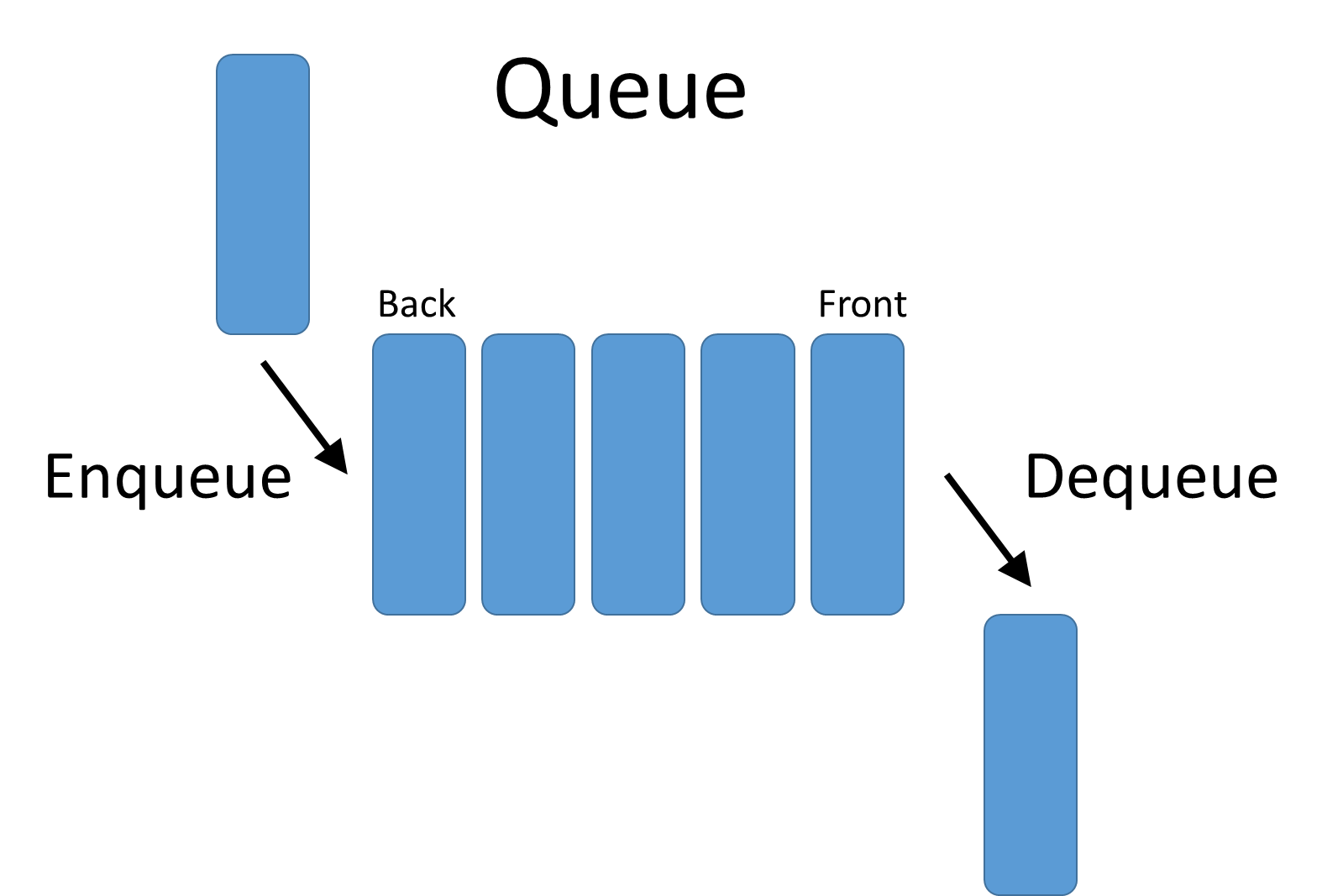
Note how we have two terms here, Enqueue and Dequeue. The enqueue term describes when we add a new item to the rear of the queue. The dequeue term describes removing the front item from the queue.
Let's take a look at how pop and push methods would work with a Queue (versus that of a Stack):
url2 = 'http://www.csit.parkland.edu/~mbrandyberry/CS2Java/Lessons/Stack_Queue/images/QueuePushPop.jpg'
Image(url2)
<IPython.core.display.Image object>
Conclusion
You should now have a basic understanding of Queues and the FIFO principal for them. In the next lecture we will implement our own Queue class!
04Implementation of Queue
Source notebook: Implementation of Queue.ipynb
Implementation of Queue
In this lecture we will build on our previous understanding of Queues by implementing our own class of Queue!
Queue Methods and Attributes
Before we begin implementing our own queue, let's review the attribute and methods it will have:
- Queue() creates a new queue that is empty. It needs no parameters and returns an empty queue.
- enqueue(item) adds a new item to the rear of the queue. It needs the item and returns nothing.
- dequeue() removes the front item from the queue. It needs no parameters and returns the item. The queue is modified.
- isEmpty() tests to see whether the queue is empty. It needs no parameters and returns a boolean value.
- size() returns the number of items in the queue. It needs no parameters and returns an integer.
Queue Implementation
class Queue:
    def __init__(self):
        self.items = []

    def isEmpty(self):
        return self.items == []

    # adds a new item to the rear of the queue
    def enqueue(self, item):
        self.items.insert(0,item)

    # removes the front item from the queue
    def dequeue(self):
        return self.items.pop()

    def size(self):
        return len(self.items)
q = Queue()
q.size()
0
q.isEmpty()
True
q.enqueue(1)
q.dequeue()
1
Good Job!
05Deques Overview
Source notebook: Deques Overview.ipynb
Deques Overview
A deque, also known as a double-ended queue, is an ordered collection of items similar to the queue. It has two ends, a front and a rear, and the items remain positioned in the collection. What makes a deque different is the unrestrictive nature of adding and removing items. New items can be added at either the front or the rear. Likewise, existing items can be removed from either end. In a sense, this hybrid linear structure provides all the capabilities of stacks and queues in a single data structure.
It is important to note that even though the deque can assume many of the characteristics of stacks and queues, it does not require the LIFO and FIFO orderings that are enforced by those data structures. It is up to you to make consistent use of the addition and removal operations.
Let's see an Image to visualize the Deque Data Structure:
from IPython.display import Image
Image('http://www.codeproject.com/KB/recipes/669131/deque.png')
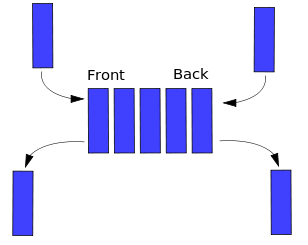
Note how we can both add and remove from the front and the back of the Deque. In the next lecture, we will implement our own Deque class!
06Implementation of Deque
Source notebook: Implementation of Deque.ipynb
Implementation of Deque
In this lecture we will implement our own Deque class!
Methods and Attributes
- Deque() creates a new deque that is empty. It needs no parameters and returns an empty deque.
- addFront(item) adds a new item to the front of the deque. It needs the item and returns nothing.
- addRear(item) adds a new item to the rear of the deque. It needs the item and returns nothing.
- removeFront() removes the front item from the deque. It needs no parameters and returns the item. The deque is modified.
- removeRear() removes the rear item from the deque. It needs no parameters and returns the item. The deque is modified.
- isEmpty() tests to see whether the deque is empty. It needs no parameters and returns a boolean value.
- size() returns the number of items in the deque. It needs no parameters and returns an integer.
Deque Implementation
class Deque:
    def __init__(self):
        self.items = []

    def isEmpty(self):
        return self.items == []

    # add new item to front
    def addFront(self, item):
        self.items.append(item)

    # add new item to rear
    def addRear(self, item):
        self.items.insert(0,item)

    # remove front item
    def removeFront(self):
        return self.items.pop()

    # removes rear item
    def removeRear(self):
        return self.items.pop(0)

    def size(self):
        return len(self.items)
d = Deque()
d.addFront('hello')
d.addRear('world')
d.size()
2
print d.removeFront() + ' ' + d.removeRear()
hello world
d.size()
0
Good Job!
07Balanced Parentheses Check
Source notebook: Balanced Parentheses Check - SOLUTION.ipynb
Balanced Parentheses Check - SOLUTION
Problem Statement
Given a string of opening and closing parentheses, check whether it’s balanced. We have 3 types of parentheses: round brackets: (), square brackets: [], and curly brackets: {}. Assume that the string doesn’t contain any other character than these, no spaces words or numbers. As a reminder, balanced parentheses require every opening parenthesis to be closed in the reverse order opened. For example ‘([])’ is balanced but ‘([)]’ is not.
You can assume the input string has no spaces.
Solution
This is a very common interview question and is one of the main ways to check your knowledge of using Stacks! We will start our solution logic as such:
First we will scan the string from left to right, and every time we see an opening parenthesis we push it to a stack, because we want the last opening parenthesis to be closed first. (Remember the FILO structure of a stack!)
Then, when we see a closing parenthesis we check whether the last opened one is the corresponding closing match, by popping an element from the stack. If it’s a valid match, then we proceed forward, if not return false.
Or if the stack is empty we also return false, because there’s no opening parenthesis associated with this closing one. In the end, we also check whether the stack is empty. If so, we return true, otherwise return false because there were some opened parenthesis that were not closed.
Here's an example solution:
def balance_check(s):

    # Check is even number of brackets
    if len(s)%2 != 0:
        return False

    # Set of opening brackets
    opening = set('([{')

    # Matching Pairs
    matches = set([ ('(',')'), ('[',']'), ('{','}') ])

    # Use a list as a "Stack"
    stack = []

    # Check every parenthesis in string
    for paren in s:

        # If its an opening, append it to list
        if paren in opening:
            stack.append(paren)

        else:

            # Check that there are parentheses in Stack
            if len(stack) == 0:
                return False

            # Check the last open parenthesis
            last_open = stack.pop()

            # Check if it has a closing match
            if (last_open,paren) not in matches:
                return False

    return len(stack) == 0
balance_check('[]')
True
balance_check('[](){([[[]]])}')
True
balance_check('()(){]}')
False
Test Your Solution
"""
RUN THIS CELL TO TEST YOUR SOLUTION
"""
from nose.tools import assert_equal

class TestBalanceCheck(object):

    def test(self,sol):
        assert_equal(sol('[](){([[[]]])}('),False)
        assert_equal(sol('[{{{(())}}}]((()))'),True)
        assert_equal(sol('[[[]])]'),False)
        print 'ALL TEST CASES PASSED'

# Run Tests

t = TestBalanceCheck()
t.test(balance_check)
ALL TEST CASES PASSED
Good Job!
08Implement a Stack
Source notebook: Implement a Stack - SOLUTION.ipynb
Implement a Stack -SOLUTION
Please refer to the lecture on implementation for a full explanation. Here is the code from that lecture:
class Stack(object):

    def __init__(self):
        self.items = []

    def isEmpty(self):
        return self.items == []

    def push(self, item):
        self.items.append(item)

    def pop(self):
        return self.items.pop()

    def peek(self):
        return self.items[len(self.items)-1]

    def size(self):
        return len(self.items)
09Implement a Queue
Source notebook: Implement a Queue - SOLUTION.ipynb
Implement a Queue - SOLUTION
Please refer to the Implementation of Queue lecture for a full explanation. The code from that lecture is below:
class Queue:
    def __init__(self):
        self.items = []

    def isEmpty(self):
        return self.items == []

    def enqueue(self, item):
        self.items.insert(0,item)

    def dequeue(self):
        return self.items.pop()

    def size(self):
        return len(self.items)
10Implement a Queue -Using Two Stacks
Source notebook: Implement a Queue -Using Two Stacks - SOLUTION.ipynb
Implement a Queue - Using Two Stacks - SOLUTION
Given the Stack class below, implement a Queue class using two stacks! Note, this is a "classic" interview problem. Use a Python list data structure as your Stack.
stack1 = []
stack2 = []
Solution
The key insight is that a stack reverses order (while a queue doesn't). A sequence of elements pushed on a stack comes back in reversed order when popped. Consequently, two stacks chained together will return elements in the same order, since reversed order reversed again is original order.
We use an in-stack that we fill when an element is enqueued and the dequeue operation takes elements from an out-stack. If the out-stack is empty we pop all elements from the in-stack and push them onto the out-stack.
class Queue2Stacks(object):

    def __init__(self):

        # Two Stacks
        self.instack = []
        self.outstack = []

    def enqueue(self,element):

        # Add an enqueue with the "IN" stack
        self.instack.append(element)

    def dequeue(self):
        if not self.outstack:
            while self.instack:
                # Add the elements to the outstack to reverse the order when called
                self.outstack.append(self.instack.pop())
        return self.outstack.pop()
Test Your Solution
You should be able to tell with your current knowledge of Stacks and Queues if this is working as it should. For example, the following should print as such:
"""
RUN THIS CELL TO CHECK THAT YOUR SOLUTION OUTPUT MAKES SENSE AND BEHAVES AS A QUEUE
"""
q = Queue2Stacks()

for i in xrange(5):
    q.enqueue(i)

for i in xrange(5):
    print q.dequeue()
0
1
2
3
4
Good Job!
11Implement a Deque
Source notebook: Implement a Deque - SOLUTION.ipynb
Implement a Deque - SOLUTION
Please refer to the Implementation of Deque lecture for a full explanation. The code from that lecture is below:
class Deque:
    def __init__(self):
        self.items = []

    def isEmpty(self):
        return self.items == []

    def addFront(self, item):
        self.items.append(item)

    def addRear(self, item):
        self.items.insert(0,item)

    def removeFront(self):
        return self.items.pop()

    def removeRear(self):
        return self.items.pop(0)

    def size(self):
        return len(self.items)